
# PKCE (RFC 7636)
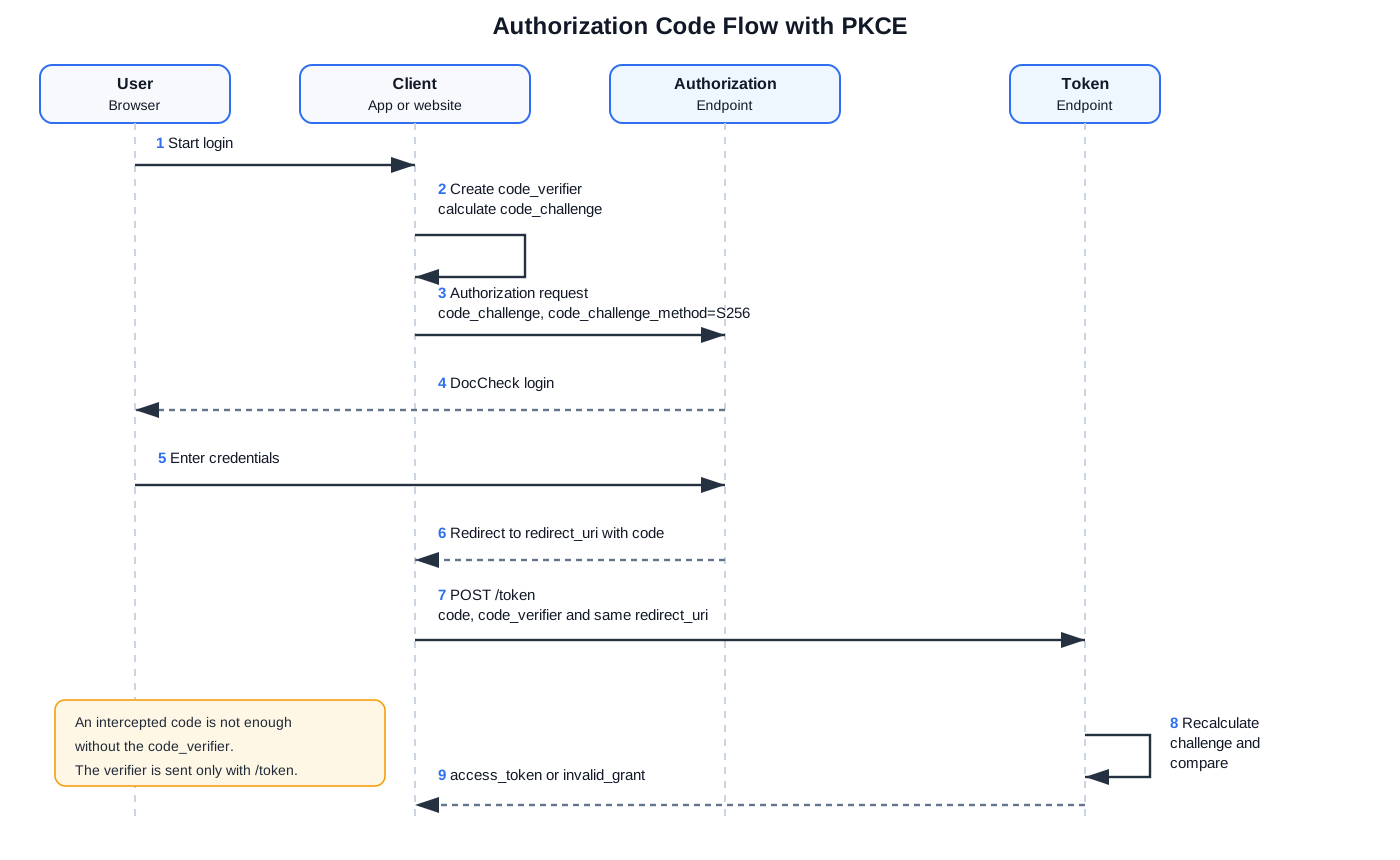
PKCE (Proof Key for Code Exchange) extends the OAuth2 Authorization Code Flow. The client first sends a code_challenge and later proves with the matching code_verifier that the same flow is being continued.
PKCE is especially useful for public clients that cannot securely store a client_secret, for example mobile apps or single page applications in the browser. It can also be used by confidential clients as additional protection for the authorization code.
# Basic example
The authorization request contains the code_challenge. scope and state are not included in this Basic example and are only added if they are used for the respective client.
https://auth.doccheck.com/en/authorize?
  response_type=code&
  client_id=[login_client_id]&
  redirect_uri=[redirect_uri]&
  code_challenge=dmXzPRkt6o9MMUkToNpkSE4Gg2UGvtDcDPtbAuRTU74&
  code_challenge_method=S256
The token request is sent as an application/x-www-form-urlencoded body. The code_verifier belongs in the body, not only in URL parameters.
POST https://auth.doccheck.com/token
Content-Type: application/x-www-form-urlencoded

client_id=[login_client_id]
client_secret=[client_secret]
grant_type=authorization_code
code=[authorization_code]
redirect_uri=[redirect_uri]
code_verifier=N7gM2zYtJq9_PvW5aSx3.Lk8-rFc4uHn0Qe6TbZ1mAo
# Example values
Example only
This value pair is for documentation only. Generate a new cryptographically random code_verifier for every authorization request.
code_verifier = N7gM2zYtJq9_PvW5aSx3.Lk8-rFc4uHn0Qe6TbZ1mAo
code_challenge = dmXzPRkt6o9MMUkToNpkSE4Gg2UGvtDcDPtbAuRTU74
code_challenge_method = S256
The code_challenge is calculated as follows:
BASE64URL-ENCODE(SHA256(ASCII(code_verifier)))
Do not use a SHA-256 hexadecimal string such as f67e2a0aff59af6cb8f02dcacf31eb1227b6e0fa6165e52971aee37439cb9117.
# Important
code_verifier: 43 to 128 characters; allowed characters areA-Z,a-z,0-9,-,.,_,~.redirect_urimust be exactly identical in the authorization request and token request.- Confidential clients can securely store a
client_secret; PKCE does not automatically replace this secret. - Public clients cannot securely protect a
client_secret; PKCE is especially important for them.
# Settings in DocCheck Access
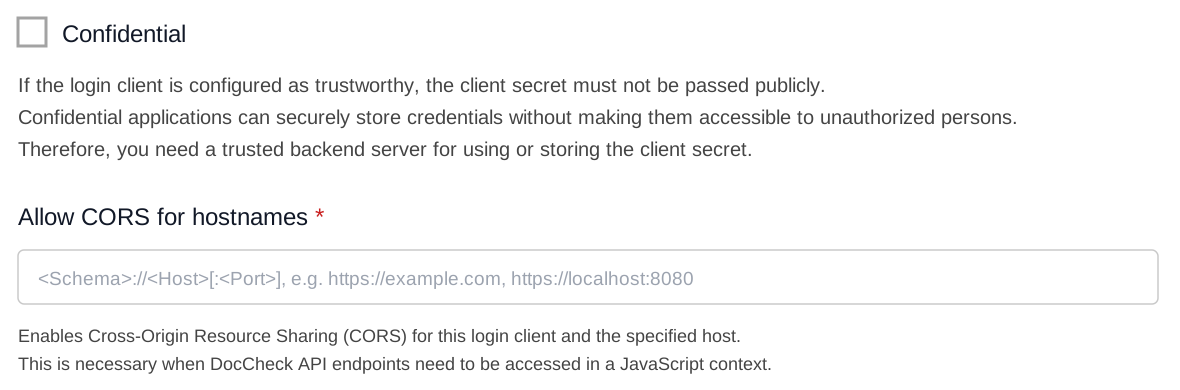
In DocCheck Access, a login client can be configured as Confidential. This means the client uses a client_secret that must only be stored on a secure backend and must not be exposed publicly in a browser or app.

With Allow CORS for hostnames, you define which browser origin may call DocCheck API endpoints directly from JavaScript. Enter only scheme, host, and optional port, for example https://example.com or https://localhost:8080.
# Typical error
invalid_grant
Failed to verify `code_verifier`
Common causes: hexadecimal encoding instead of Base64URL, wrong code_verifier, changed code_verifier, or code_verifier not sent in the form-url-encoded token request body.
Reference: RFC 7636 (opens new window), especially sections 4.1 to 4.6 and Appendix A.