
# User account
All DocCheck applications are accessible with a DocCheck user account. Please register once in the portal. Here you’ll find information and links for registration.
To create a company account or a DocCheck login in DocCheck Access, you need a DocCheck user account. Register for free at https://www.doccheck.com/register (opens new window).
After registration, you’ll receive a verification link for your email address.
# Account creation
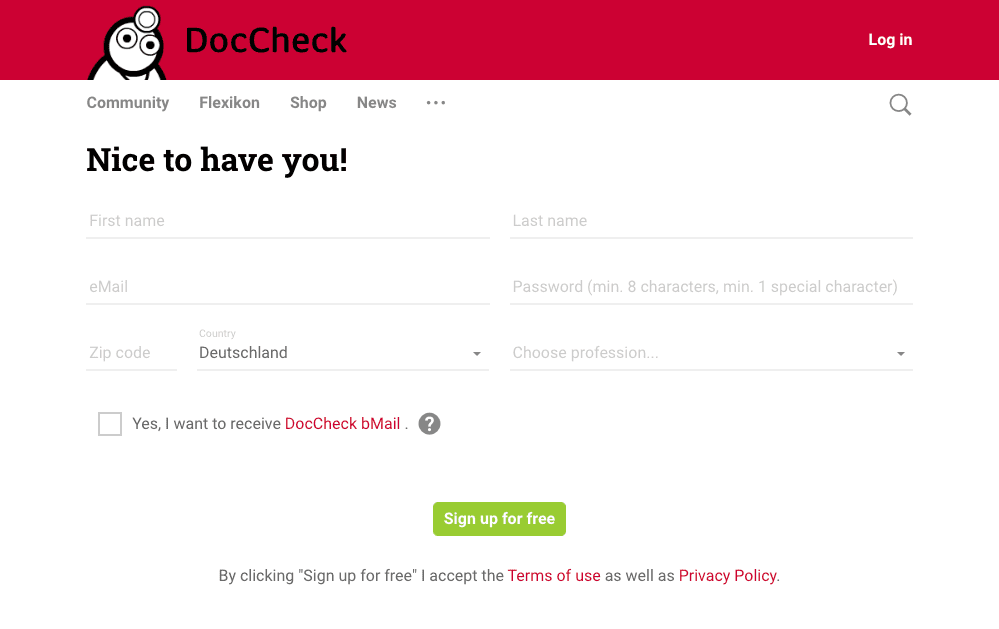
Fill in the following fields and click “Register for free” to create your user account:
- First name
- Last name
- Email address (ideally your personal business email)
- Password
- ZIP code
- Country
- Profession
- Button → “Register for free”
Info
For setting up and managing logins, regular registration as a user is sufficient. Verification only matters when you want to access other websites protected by DocCheck Login, and only if your profession is allowed on that specific website.
As profession, you can choose, for example, “Industry/Agency employee”, “Non-medical profession”, or “Other medical profession”.
# Proof of profession
To learn more about our user verification process, see our FAQ: Proof of profession (opens new window) (German).